
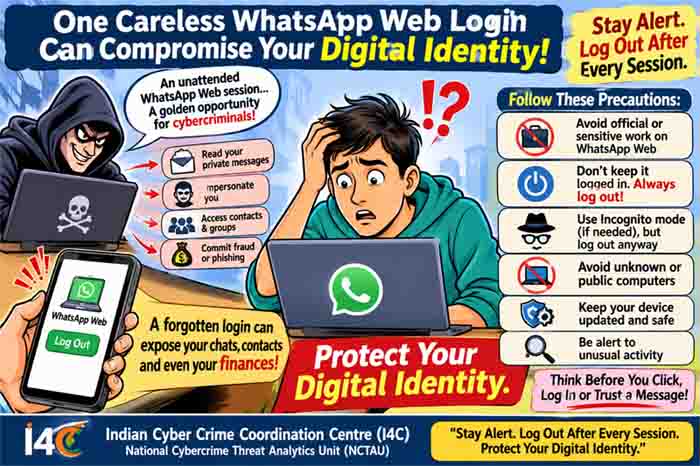
- An authenticated WhatsApp Web session could become a gateway for unauthorised access to personal accounts, warns I4C’s cybercrime threat analytics unit
- Malicious actors may read private messages, impersonate account holders and exploit trusted identities to defraud contacts
- Users cautioned against leaving WhatsApp Web logged in on office, shared or public computers
- Incognito mode offers an additional precaution but does not replace the need to manually log out after every session
- Organisations advised to avoid using WhatsApp Web on office computers for official, confidential and sensitive communications
NE LEGAL BUREAU
NEW DELHI, NOV 24
A single careless login can turn a trusted WhatsApp account into a potential instrument of cybercrime. A forgotten WhatsApp Web session on an office computer, an unattended browser or access through an untrusted device could expose private conversations and give malicious actors an opportunity to impersonate the account holder. In a fresh cybersecurity advisory, the National Cybercrime Threat Analytics Unit (NCTAU) of the Indian Cyber Crime Coordination Centre (I4C) has urged users to exercise caution while accessing WhatsApp Web and make logging out after every session a non-negotiable digital safety habit.
How an authenticated session can be exploited
According to the NCTAU, an authenticated WhatsApp Web session may, under certain circumstances, be misused to gain unauthorised access to a user’s WhatsApp account.
Such access could enable malicious persons to read private messages, send messages by impersonating the account holder, access contacts and group conversations, and exploit the credibility attached to the victim’s identity.
The consequences could extend beyond the individual user. Cybercriminals may use a compromised account to circulate fraudulent payment requests, phishing links, misleading messages and social-engineering attempts among unsuspecting friends, relatives, colleagues and members of WhatsApp groups.
The danger is particularly significant because messages originating from a familiar and trusted contact are more likely to be believed and acted upon.
Seven precautions every WhatsApp user should follow
The NCTAU has outlined a series of precautionary measures to minimise the risk of unauthorised access and misuse:
- Avoid sensitive official communications: Government, organisational, financial, confidential and other sensitive information should preferably not be exchanged through WhatsApp Web sessions on computers.
- Do not remain permanently logged in: Avoid keeping an authenticated WhatsApp Web session active when it is not required, particularly on office and shared computers.
- Log out after every session: Make manual logout a routine practice. Simply closing the browser window or tab should not be considered equivalent to logging out.
- Use Incognito or Private Browsing when necessary: If WhatsApp Web must be accessed temporarily, use Incognito or Private Browsing mode on a trusted computer. However, this is only an additional precaution; users must manually log out before closing the browser.
- Stay away from unknown computers: Avoid logging in through cybercafes, public kiosks, hotel business centres, borrowed computers and other untrusted systems.
- Watch for unusual account activity: Unexpected messages sent from your account, unusual replies from contacts or unexplained activity should immediately raise suspicion and be investigated.
- Keep devices protected: Regularly update operating systems, browsers and security software. Avoid suspicious downloads, unknown files, cracked software and untrusted attachments.
Organisations need stronger digital hygiene
The advisory also carries an important message for offices, institutions and organisations where employees routinely access WhatsApp Web from workplace computers.
For official and sensitive environments, organisations are advised to avoid the use of WhatsApp Web on office computers. Where its use is unavoidable, Incognito or Private Browsing should be treated only as an additional precaution and not as a substitute for secure logout practices.
Institutions should also sensitise employees to the risks associated with unattended authenticated sessions, shared systems and unauthorised access to workplace devices.
Think before you click, log in or trust a message
In an era when WhatsApp groups have become an everyday source of information, communication and even financial transactions, digital awareness is as important as physical security.
Users must remember that a message appearing under the name and profile photograph of a known person is not, by itself, proof that the genuine account holder has sent it. Unexpected requests for money, OTPs, confidential information or urgent financial assistance should always be independently verified through another communication channel.
The NCTAU’s central message is clear:
“Stay Alert. Log Out After Every Session. Protect Your Digital Identity.”
The advisory is a timely reminder that cybersecurity does not always begin with sophisticated technology. Sometimes, it begins with the simple habit of logging out.